
A beginner-friendly guide to room layout, speaker placement, power, TV connections, and compatibility.
A 5.1 soundbar system can fit many small and large rooms. The deciding factor is usually the layout, not square footage alone. Before buying, check the space around the TV and sofa, safe positions for the rear speakers and subwoofer, nearby power outlets, cable routes, and the TV’s audio connections. Also remember that “wireless” usually describes the audio link. The rear speakers, receiver, or subwoofer may still need power cords or short speaker wires.
A 5.1 soundbar system uses five main audio channels—front left, center, front right, surround left, and surround right—plus a subwoofer channel. Several front channels may be built into one soundbar, so “5.1” does not always mean six separate speaker boxes.
A soundbar with wireless rear speakers can provide real surround channels without a long audio cable running from the TV to the sofa. It still needs sensible placement, safe power, and verified compatibility.
What Should You Check Before Buying?
Start with the room, not the channel number. A 5.1 soundbar with wireless rear speakers may fit a compact room well, while the same system may be awkward in a larger room with blocked walkways or no power near the sofa.
Sketch the TV, sofa, doors, outlets, walkways, and shared walls. Then compare that layout with the package contents and connection diagram.
| Check | Why It Matters |
|---|---|
| TV clearance | Prevents the soundbar from blocking the screen or remote sensor |
| Sofa position | Shows whether rear speakers can sit beside or slightly behind the main seat |
| Power outlets | Rear speakers, a receiver, and the subwoofer usually still need power |
| Walkways | Keeps stands and cables from becoming trip hazards |
| Shared walls | Helps you judge whether subwoofer vibration may disturb neighbors |
Space, Power, and Cable Routes
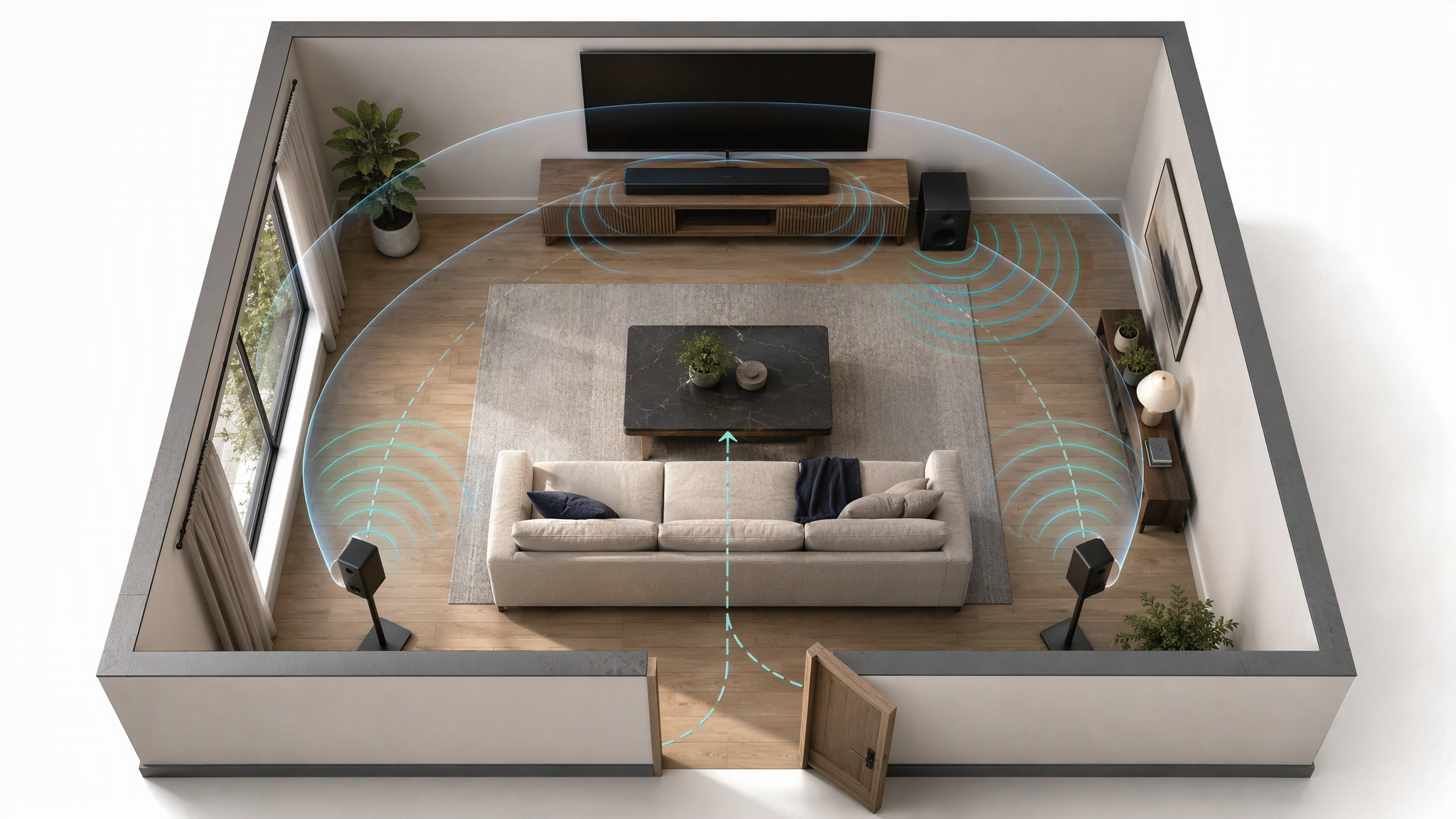
Measure the width and height available below the TV. Check whether the bar fits between the TV feet and whether it could block the picture or remote sensor.
At the sofa, mark one possible rear-speaker position on each side. Include the bases of any stands and make sure doors can open normally.
Count power for the soundbar, subwoofer, rear speakers or rear receiver, and charging accessories. A cord crossing a walkway means the current plan does not fit safely.
Why Wireless Does Not Mean Cable-Free
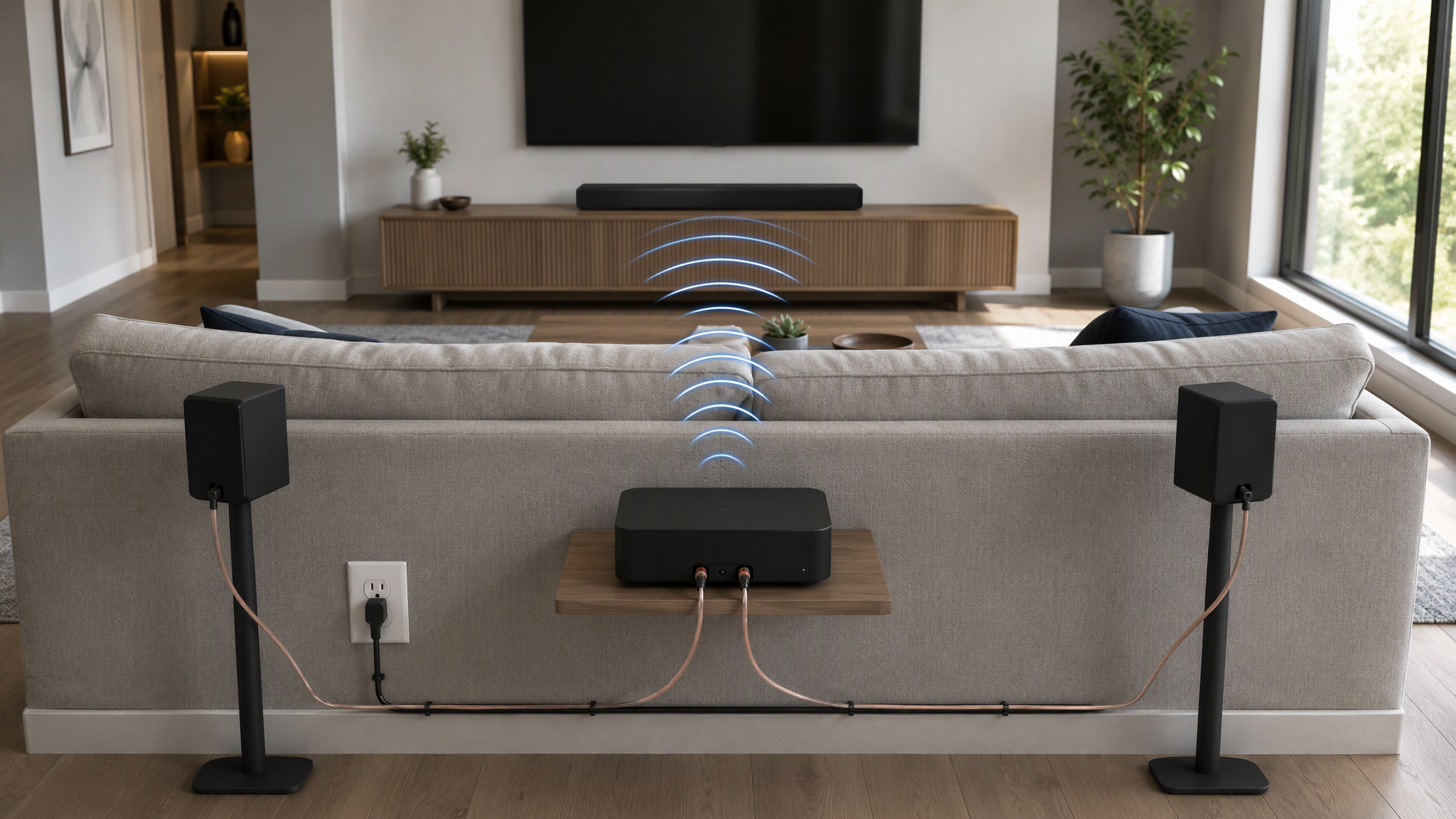
No, wireless rear speakers are not always cable-free. “Wireless” usually describes the audio link from the soundbar to the rear section.
- Individually powered speakers receive audio wirelessly but each needs an outlet.
- A powered rear receiver plugs in and connects to both speakers with short wires.
- Battery-powered detachable speakers work without cords during use but need charging.
Samsung’s official rear-speaker guide documents both receiver-based and individually powered arrangements for specific models. The design varies, so check the exact package rather than the word “wireless.”
Find the connection diagram and count every outlet, receiver, speaker wire, and charging accessory. For more detail, read Do Wireless Rear Speakers Need Power?
Where Should You Place Each Component?
Place each component for function first. The soundbar needs a clear path into the room, the surrounds need useful positions around the main seat, and the subwoofer needs controlled bass.
Soundbar Placement
Center the soundbar near the TV. Keep its grille clear, leave room for cable bends, and avoid blocking the screen or remote sensor.
Do not push a model with upward-facing drivers deep inside a shelf. If you plan to wall-mount it, check the bracket, ventilation, clearance, and port access. See Samesay’s soundbar placement guide for the front-of-room details.
Surround Speaker Placement
Rear speakers do not have to sit directly behind the sofa. They can usually sit at the sides of the main seat or slightly behind it.
- Use one speaker on each side of the listening area.
- Start at seated ear level or slightly above it.
- Keep them clear of cushions and tall furniture.
- Use level or distance controls when one side is farther away.
If the sofa is against the wall, narrow stands or supported wall brackets may work. Lower the rear level if the speakers sound too close.
Subwoofer Placement and Calibration
Test more than one safe subwoofer position. Start near the front wall or media cabinet. A corner may add bass but can also make it boomy.
Listen from the normal seat before changing the bass control. After all components are in their likely final positions, run automatic calibration or adjust the center, rear, and subwoofer levels manually.
Rear speakers may be quiet during dialogue and become active only when a soundtrack contains ambience or surround effects. That does not automatically mean they are faulty.
After setup, use a built-in test tone or a scene you know well. Confirm that sound reaches both rear speakers, dialogue stays centered, and the subwoofer blends with the bar rather than drawing attention to one corner. Make small level changes from the main seat instead of judging each speaker while standing beside it.
Is a 5.1 Soundbar Too Much for a Small Room?
Usually not. Room layout matters more than square footage. A small room can support 5.1 when the rear speakers have safe positions, bass is adjustable, and every component can reach power. A larger room may still be unsuitable if doors, outlets, or an open layout prevent useful surround placement.
Avoid fixed claims such as “5.1 is best for 100–250 square feet.” Instead, check the distance from the rears to your ears, whether the sofa is against a wall, whether the subwoofer can be lowered, and whether every cable route is safe.
A small apartment has a sofa against the back wall, one outlet at each end, and room for a subwoofer beside the TV cabinet. A 5.1 system may fit if the rear speakers can sit slightly above ear level and their volume can be lowered. If the only power route crosses a doorway, a 3.1 soundbar is safer.
When Is a 2.1 or 3.1 Soundbar Better?
Choose a simpler system when the rears cannot be placed or powered safely. A well-installed 2.1 or 3.1 soundbar is more useful than a 5.1 system with speakers beside the listener’s ears or cords across the floor.
A simpler system also makes sense when you mainly watch news and dialogue-heavy programs, strong bass would disturb neighbors, or easy installation matters more than rear effects. A 3.1 layout can be helpful for speech because it includes a center channel.
Apartment and Neighbor Considerations
A surround system can work in an apartment, but the subwoofer is often the bigger concern. Keep it away from a shared wall when possible and avoid cabinets that rattle.
Look for independent bass and rear-level controls, Night Mode, and Dialogue Enhancement. Stable placement or an isolation pad may reduce vibration, but it cannot stop all sound passing through the building.
At night, lower the subwoofer first rather than reducing only the main volume. If dialogue then becomes hard to hear, use Dialogue Enhancement or Night Mode instead of turning the whole system back up. These controls make a surround package easier to share with neighbors and other people at home.
Do You Need HDMI eARC for Surround Sound?
No, not for every surround setup. HDMI ARC and optical can carry some compressed surround formats when the source, TV, and soundbar support them. eARC matters when audio returning from the TV needs more bandwidth, such as compatible uncompressed multichannel PCM, Dolby TrueHD, DTS-HD Master Audio, or lossless Atmos.
| Connection | When It May Be Enough | Main Limit |
|---|---|---|
| Optical | Stereo PCM and supported compressed Dolby Digital 5.1 | Does not carry every 5.1 format or Dolby Digital Plus/TrueHD Atmos |
| HDMI ARC | Common TV audio and compatible Dolby Digital Plus, including some streaming Atmos setups | Less bandwidth than eARC |
| HDMI eARC | Compatible lossless or uncompressed multichannel audio returned from the TV | Both devices and the full playback chain must support the format |
Sony’s official eARC guidance lists high-bitrate formats such as uncompressed 5.1/7.1, Dolby TrueHD, DTS:X, and DTS-HD Master Audio.
Streaming Atmos is commonly delivered through Dolby Digital Plus and may work over compatible ARC. Lossless Atmos may use Dolby TrueHD and generally needs a compatible eARC return path when routed through the TV. Sony’s Atmos connection guide shows why the complete path matters.
Two Common Connection Paths
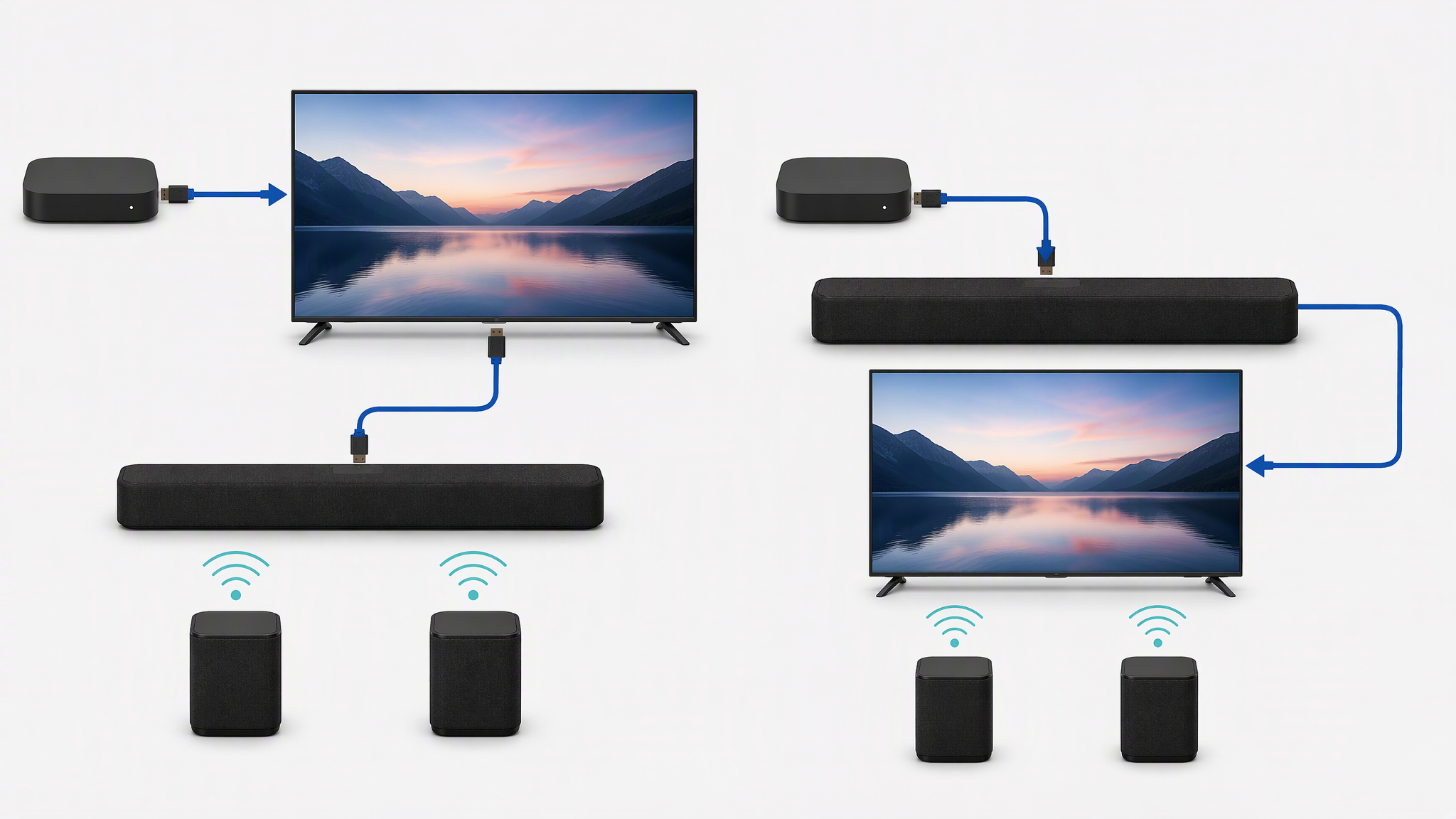
Source → TV → Soundbar
The TV returns audio through ARC or eARC. The source format, TV passthrough settings, TV port, and soundbar decoder all affect the result.
Source → Soundbar → TV
The soundbar handles audio and forwards video to the TV. This may avoid a TV audio-return limit, but the soundbar must pass the resolution, HDR, refresh rate, and gaming features you need.
Important: eARC handles audio return between the TV and soundbar. It does not control how wireless rear speakers connect.
For a fuller interface explanation, read HDMI ARC vs Optical for Soundbars.
Can You Mix Rear Speakers and Soundbars from Different Brands?
Usually not. Compatibility is normally model-specific, not just brand-specific. Dedicated rear speakers may rely on a proprietary wireless link, a specified receiver, channel assignment, firmware, and an approved soundbar model. Bluetooth or a matching brand logo does not prove compatibility.
Why the Exact Model Matters
Rear speakers must receive separate surround channels at the correct time. A company may use different kits, receivers, or firmware across product ranges and years.
Samsung’s support guide tells buyers to match the rear kit to supported models. LG’s SPQ8-S manual states that the kit works only with specified LG soundbars and not with other companies’ soundbars.
The correct question is: Does the manufacturer list this exact rear-speaker kit as compatible with this exact soundbar model?
Why Bluetooth or a Transmitter May Not Help
Bluetooth music playback is not the same as dedicated surround. A phone may send stereo music to a soundbar, but rear speakers need synchronized left-rear and right-rear channels.
A wireless transmitter can relay only the channels available at its input. If the soundbar does not output separate rear channels, the transmitter cannot create them.
An AV receiver is a different system. It can decode surround audio and drive conventional speakers, but it is not a simple rear-speaker add-on for most soundbars.
Compatibility Checks Before Buying
- Record the exact soundbar and rear-kit model numbers.
- Find the manufacturer’s official accessory list.
- Check whether a receiver or dongle is required.
- Confirm the power arrangement and included cables.
- Check product year, region, and firmware requirements.
- Confirm rear-level or distance adjustment.
- Verify whether the rear kit is included or optional.
If the exact model pairing cannot be confirmed, treat compatibility as unverified.
After pairing, do not rely only on a blue connection light. Use the system’s test tone or channel check to confirm that the left rear plays from the left side and the right rear from the right side. Then play real surround content and verify that the soundbar reports the expected input format where its display or app provides that information.
Final Room-Fit Checklist
The System Is Likely to Fit If…
- The soundbar will not block the screen or remote sensor.
- The rears can sit beside or slightly behind the main seat.
- Every powered component has a safe outlet.
- The subwoofer will not block a door or walkway.
- The TV connection supports the formats you use.
- The exact rear kit is officially compatible.
It May Fit with Some Compromises If…
- The sofa is against the wall.
- The room is asymmetrical.
- One rear speaker must sit farther away.
- The subwoofer has only one practical position.
- You need stands, wall brackets, or lower channel levels.
These are manageable only when the system offers suitable placement and level controls.
Choose a Simpler System If…
- The rears can only sit directly beside the listener’s ears.
- Power cords must cross a walkway.
- Low-frequency output cannot be controlled.
- Doors or furniture prevent useful surround placement.
- The rear kit is not officially compatible.
- Your main needs are clear dialogue and easy setup.
Final Verdict: Room Layout Matters More Than Room Size
Do not accept or reject a 5.1 system from square footage alone. Check placement, power, walking paths, TV connections, compatibility, and bass control. If the rears cannot be installed safely or positioned usefully, a good 2.1 or 3.1 soundbar will usually be more practical than a 5.1 system forced into the wrong room.
Frequently Asked Questions
Do Wireless Rear Speakers Need Power Outlets?
Usually, yes. They may plug in separately or connect to one powered rear receiver. Battery-powered designs still need charging. Check the package diagram before buying.
Can the Subwoofer Go Behind the Sofa?
Yes, if it is safe and sounds balanced. It needs power, ventilation, and a stable wireless link. Compare it with another position before adjusting bass.
Do Rear Speakers Play Sound All the Time?
Not always in an obvious way. Their output depends on the soundtrack, source format, and sound mode. Surround channels may stay subtle until a scene uses them.
Can You Add Rear Speakers Later?
Sometimes. The soundbar must support an optional rear kit, and the exact models must be compatible. Check the official accessory list first.
Does Dolby Atmos Always Require HDMI eARC?
No. Streaming Atmos may work through Dolby Digital Plus over compatible ARC. Lossless Atmos in Dolby TrueHD generally needs compatible eARC when returned through the TV, or another supported path.
Evidence boundary: The examples above use the linked Samsung, LG, Sony, and Samesay documentation. Exact power, pairing, format, and placement requirements remain model-specific.