As home audio technology advances, many consumers are faced with the decision of choosing between soundbars that connect via Bluetooth and those that use Wi-Fi. Each method has its advantages and disadvantages, making it essential to understand their differences to select the best option for your audio needs. This article explores the features, benefits, and drawbacks of both Bluetooth and Wi-Fi wireless connections for soundbars.
As home audio technology advances, many consumers are faced with the decision of choosing between soundbars that connect via Bluetooth and those that use Wi-Fi. Each method has its advantages and disadvantages, making it essential to understand their differences to select the best option for your audio needs. This article explores the features, benefits, and drawbacks of both Bluetooth and Wi-Fi wireless connections for soundbars.
Understanding Soundbar Bluetooth Connectivity
Bluetooth is a short-range wireless technology that allows devices to connect and communicate over short distances, typically up to 30 feet (approximately 10 meters). When it comes to soundbars, Bluetooth enables users to stream audio directly from smartphones, tablets, laptops, and other Bluetooth-enabled devices.
Whether it’s a phone, tablet, computer, or even some Bluetooth-compatible TVs, connecting is easy. The general steps are: first, activate the soundbar’s Bluetooth pairing mode; then, enable Bluetooth on your device and search for the soundbar; finally, select the soundbar from the list and wait for the confirmation that the connection is successful. Once paired, you can start playing audio immediately. This straightforward process makes Bluetooth soundbars an ideal choice for multi-device compatibility.
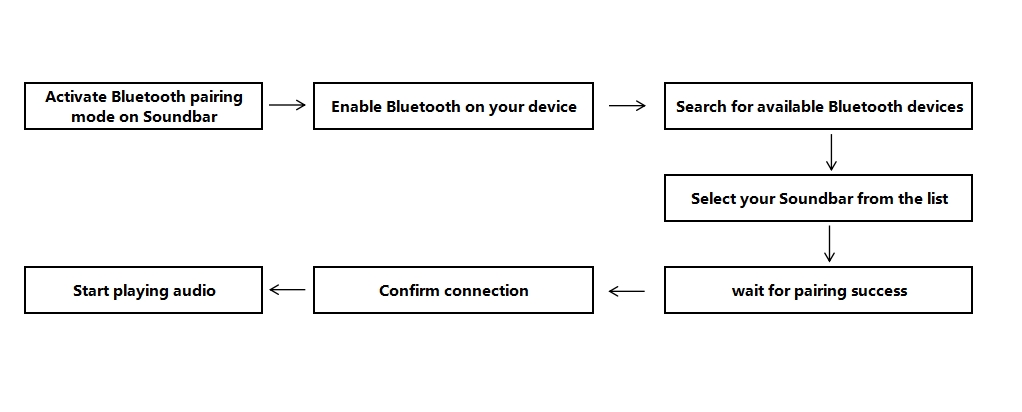
Soundbar Bluetooth Connection Process
Advantages of Soundbar Bluetooth Connection
1. Simplicity and Convenience
Setting up a Bluetooth connection is often straightforward and user-friendly, making it accessible for users of all ages. For example, elderly family members can quickly play the morning news or music from their phone without any complicated setup.
2. Widespread Compatibility
Almost all smartphones, tablets, and laptops come with built-in Bluetooth capabilities, allowing for easy connectivity with a variety of devices. This means that during a gathering with friends, different brands of phones can take turns playing songs, and all devices can connect smoothly.
3. Portability
Bluetooth soundbars can be used in various locations, as they do not rely on a stable internet connection. This allows you to enjoy high-quality music from your phone while camping or having a backyard barbecue, without the need for wiring.
Disadvantages of Sound Bar Bluetooth Connection1. Limited Range
The effective range of Bluetooth is relatively short, meaning you may need to stay within close proximity to the soundbar for optimal performance.2. Potential for Audio Quality Loss
While many modern Bluetooth codecs (like aptX) can deliver high-quality audio, standard Bluetooth streaming may result in some loss of sound quality compared to wired connections or Wi-Fi.3. Connection Stability
Bluetooth connections can sometimes experience dropouts or interruptions, especially in environments with many competing wireless signals.
Latest Bluetooth Technologies in Soundbars
To enhance connection stability, audio quality, and user experience, modern soundbars have incorporated several advanced Bluetooth technologies, including:
1. Bluetooth 5.3 / 5.4 Standards
The latest Bluetooth versions offer improved data transmission stability, interference resistance, and power efficiency. This allows users to maintain a stable connection with the soundbar over longer distances while conserving device battery life.
2. Low-Latency Codecs (aptX Low Latency / aptX Adaptive)
These codecs significantly reduce audio transmission delay, ensuring synchronization between audio and video. This is particularly beneficial for watching movies, gaming, or other real-time interactive scenarios.
3.High-Quality Audio Codecs (aptX HD / LDAC / LHDC / LC3)
Soundbars that support these advanced codecs can deliver higher data bandwidth for near-lossless audio performance, providing richer detail and dynamic range to satisfy users with higher sound quality demands.
4. Wide Device Compatibility
These new technologies not only improve audio quality and connection stability but also allow soundbars to connect seamlessly with smartphones, tablets, laptops, and even some TVs. No additional adapters or transmitters are needed to enjoy high-quality wireless audio. For example, you can directly connect an aptX-supported Android phone to the soundbar via Bluetooth to stream lossless music, achieving clear, low-latency, high-fidelity sound without buying extra converters or adapters.
5. Enhanced Interference Resistance
With multi-channel frequency selection and optimized protocols, modern Bluetooth maintains stable transmission even in environments with heavy wireless interference, minimizing dropouts or audio interruptions.

Exploring Soundbar Wi-Fi Connectivity
Wi-Fi, on the other hand, uses your home’s wireless network to connect devices, allowing for a more stable and extensive range compared to Bluetooth. Soundbars with Wi-Fi capabilities can stream audio directly from the internet or other devices on the same network.
When a soundbar supports Wi-Fi connectivity, it can stream music directly from the internet or other devices on the same home network. Simply put, the music is not “sent” from your phone to the soundbar as it is with Bluetooth. Instead, the soundbar itself plays the audio through the Wi-Fi network, while your phone is only used to select tracks and control playback. As a result, the music continues to play smoothly even if your phone is locked, switched to another app, or moved to a different room.
The key difference is that Bluetooth playback requires the phone to be actively involved, whereas in Wi-Fi streaming mode, the soundbar can play music independently, with the phone serving only as a controller.
Detailed Steps for Connecting a Soundbar via Wi-Fi1.Power on the Soundbar and access network settingsLocate the “Settings” or “Network” menu on your Soundbar and ensure the device is ready to connect.2.Select the Wi-Fi connection optionChoose “Wi-Fi” or “Wireless Network Setup” from the menu. The Soundbar will scan for available networks nearby.3.Choose your home network and enter the passwordFrom the list, select your home Wi-Fi network and enter the correct password to confirm the connection.4.Wait for the connection to completeDuring the process, the device typically shows progress or indicates the connection status via LED lights. Confirm that the Soundbar has successfully joined the network.5.Test audio playbackMake sure your smartphone, tablet, laptop, or smart TV is connected to the same Wi-Fi network. You can then stream audio directly, enjoying high-quality wireless sound without the need for additional adapters.6.Optimize and set up multi-room playback For Soundbars that support multi-room functionality, you can add other Wi-Fi speakers through the companion app to create a synchronized whole-home audio system. For example, in the app, you can group the living room, bedroom, and kitchen speakers under the same Wi-Fi network. When playing music or movies, selecting the speaker group allows audio to play simultaneously in multiple rooms without manually operating each speaker or switching sources.
Wi-Fi connections are ideal for home or fixed setups. They provide stable, long-range audio, making them perfect for users seeking high-quality sound and multi-room audio experiences. Unlike Bluetooth, Wi-Fi minimizes interference and connection dropouts, even in environments with multiple wireless devices.
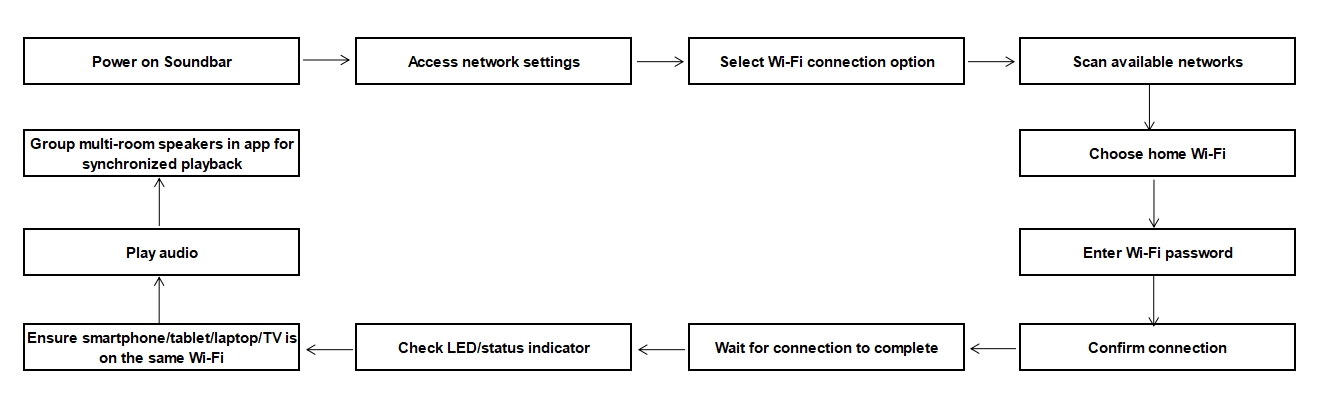
Soundbar Wifi Connection Process
Advantages of Soundbar Wi-Fi Connection1. Superior Audio Quality
Wi-Fi connections generally offer higher bandwidth than Bluetooth, allowing for lossless audio streaming. This is especially beneficial for audiophiles who prioritize sound quality.2. Extended Range
Wi-Fi networks typically cover a larger area than Bluetooth, allowing you to position your soundbar further away from the source device without sacrificing connection stability.3. Multi-Room Audio
Many Wi-Fi-enabled soundbars support multi-room audio features, enabling users to connect multiple speakers throughout their home for a synchronized listening experience.
Disadvantages of Sound Bar Wi-Fi Connection1. Complex Setup
Connecting a soundbar to Wi-Fi may require more initial setup, such as entering your network credentials and ensuring a stable internet connection. This can be a barrier for less tech-savvy users.2. Dependency on Internet
Wi-Fi connections rely on a stable internet connection. If your internet goes down, you may not be able to stream music or connect to the soundbar.3. Interference Issues
Wi-Fi networks can sometimes experience interference from other devices or networks, potentially affecting the connection quality and performance.
Bluetooth vs Wi-Fi Soundbar: Feature Comparison
| Dimension |
Bluetooth Connection |
Wi-Fi Connection |
| Connection Type |
Short-range wireless (approx. 10 meters / 30 feet) |
Through home Wi-Fi network, wider coverage |
| Audio Quality |
Moderate; high-end codecs (aptX/aptX HD) can improve quality |
High; supports lossless or high-bitrate audio streaming |
| Connection Stability |
May be affected by interference, possible dropouts or delays |
Relatively stable, though network interference may occur |
| Device Compatibility |
Smartphones, tablets, laptops, and other Bluetooth-enabled devices |
Phones, tablets, computers, smart speakers on the same network |
| Ease of Use |
Simple pairing, plug-and-play |
Initial setup requires network credentials, slightly more complex |
| Portability |
High; can be moved or used outdoors |
Low; depends on fixed power and home network |
| Coverage Range |
Short (~10 meters / 30 feet) |
Wide; can cover the entire home |
| Multi-Room Playback |
Generally not supported |
Supported; can synchronize multiple speakers |
| Network Dependency |
Not dependent on the internet |
Requires stable network; streaming may be affected if network is down |
| Typical Use Cases |
Outdoor gatherings, temporary use, mobile scenarios |
Home theater, multi-room systems, high-fidelity music listening |
| Installation Difficulty |
Easy |
More complex; requires network setup |
When choosing a soundbar, the connection method is a key factor that affects the overall user experience. Understanding the differences between wireless connection types—their applicable scenarios, technical principles, and potential limitations—can help you make an informed decision. Here are some professional guidelines:
1. Usage Scenarios Determine Your Choice
Daily Home Viewing and Light Use
If the primary use is watching TV shows, short videos, or occasionally listening to music, a Bluetooth soundbar is sufficient. Bluetooth connections are simple and quick to set up, requiring only device pairing, making them ideal for users who are not tech-savvy or who want an easy, plug-and-play experience.
High-Quality Music and Multi-Room Audio Required
If you prioritize audio fidelity, such as playing lossless music, a Wi-Fi soundbar is more suitable. Wi-Fi offers higher bandwidth for lossless audio streaming and can work with multi-room audio systems, providing an immersive listening experience. Although Bluetooth can support multi-room audio playback, it often requires extra coordination and may suffer from latency, whereas Wi-Fi makes synchronized multi-room playback simpler and more reliable.
Versatile and Mobile Use
For outdoor use, parties, or temporary setups, Bluetooth soundbars offer portability and independence from home networks, allowing users to play audio without relying on Wi-Fi.
2. Technical Requirements and Device Compatibility
Bluetooth Connection
Almost all modern smart devices support Bluetooth, including smartphones, tablets, laptops, and even some TVs. The latest Bluetooth versions (e.g., Bluetooth 5.4) provide more stable connections, longer range, and higher-quality audio codecs (such as aptX and LDAC) to reduce latency and audio loss.
Wi-Fi Connection
Wi-Fi not only allows communication with local devices but also enables direct streaming from the internet or a home NAS. Some Wi-Fi soundbars support smart home protocols (like Apple AirPlay and Google Cast), allowing seamless integration with smart home ecosystems.
3. Consider Network Environment and Stability
Bluetooth
Best suited for short-range environments with minimal signal interference, typically under 10 meters. For most households, Bluetooth is stable enough, though connection drops may occur in dense wireless environments.
Wi-Fi
Requires a stable home wireless network. If the router coverage is limited or the network fluctuates, audio streaming may be affected. It is recommended to choose Wi-Fi soundbars that support dual-band (2.4GHz + 5GHz) to ensure higher stability and performance.
A simple summary for deciding your soundbar connection:For Simplicity: If you prioritize ease of use and quick setup, a Bluetooth soundbar may be the better choice, especially for casual listening.For Sound Quality: If audio fidelity and the ability to stream high-quality music from various sources are your main concerns, a Wi-Fi soundbar will likely meet your expectations.For Versatility: If you enjoy hosting gatherings or need a portable solution, Bluetooth soundbars offer the convenience of mobility.For Multi-Room Setups: If you plan to integrate your soundbar into a larger home audio system with multiple speakers, Wi-Fi connectivity provides the necessary flexibility and audio quality.
Why Bluetooth Soundbars Dominate the Market
Although Wi-Fi soundbars offer advantages in audio quality and multi-room playback, Bluetooth soundbars continue to dominate the market. The main reasons include:
Affordable Price: Bluetooth soundbars generally have lower manufacturing costs, making them more accessible to a wide range of consumers. They are especially suitable for mid-range markets and average household budgets.
Simple Operation: Pairing is intuitive and straightforward, requiring just a few steps to connect. This plug-and-play simplicity allows users to quickly enjoy high-quality audio without complicated network setup or technical knowledge.
Portable and Flexible: Bluetooth soundbars do not rely on a stable internet connection, making it easy to move them between locations. Whether for indoor gatherings, outdoor events, or temporary use, they are highly adaptable.
Wide Compatibility: Almost all smartphones, tablets, laptops, and even some TVs support Bluetooth, ensuring smooth connectivity across multiple devices. This high compatibility meets the needs of modern households with diverse electronic devices.
Rapid Market Adoption: Thanks to these advantages, Bluetooth soundbars have quickly gained market recognition and become the preferred choice for both home and portable audio. Manufacturers also tend to promote Bluetooth products more aggressively, further accelerating their adoption.
Overall, for users who prioritize convenience, flexibility, and cost-effectiveness, Bluetooth soundbars remain the most popular choice and continue to be a key mainstream option in home audio systems.Both Bluetooth and Wi-Fi wireless connections have their unique advantages and disadvantages when it comes to soundbars. Understanding these differences can help you make an informed decision that best suits your audio needs. Ultimately, whether you choose Bluetooth for its simplicity and portability or Wi-Fi for superior sound quality and extended range, each option can enhance your home entertainment experience in its own way.


