Categories
Can Your Soundbar Connect with Gaming Consoles?
Connecting a soundbar to a gaming console can provide richer sound, improved immersion, and a more cinematic experience. But can your soundbar connect with your gaming console? In most cases, yes — and here's how, along with tips on maximizing your setup for gaming.
Jul 14th,2020
5422 Views
With gaming consoles like the PlayStation, Xbox, and Nintendo Switch becoming central to home entertainment, gamers are increasingly looking to enhance their audio experience. Connecting a soundbar to a gaming console can provide richer sound, improved immersion, and a more cinematic experience. But can your soundbar connect with your gaming console? In most cases, yes — and here's how, along with tips on maximizing your setup for gaming.
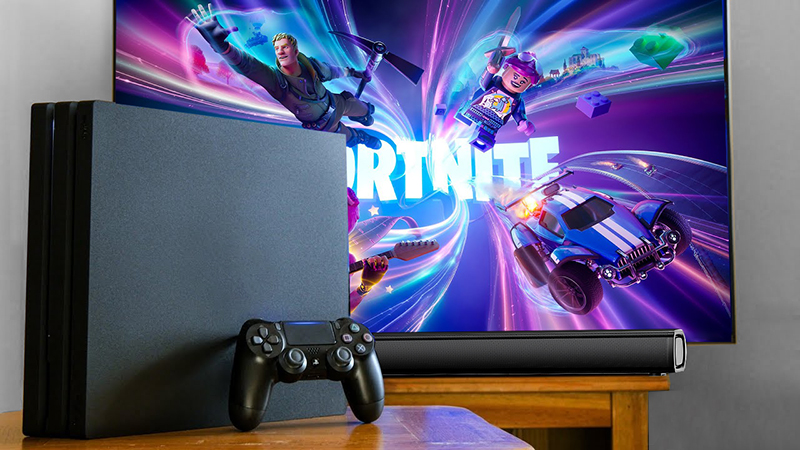 1. Connection Methods for Gaming Consoles and SoundbarsMost gaming consoles and soundbars today come with various connectivity options, making it relatively straightforward to set up. Here are the main connection types:- HDMI ARC/eARC: Many soundbars support HDMI ARC (Audio Return Channel) or the newer eARC version, which allows two-way audio transmission between the soundbar and the console. If your TV and soundbar have HDMI ARC/eARC ports, connect your console to the TV via HDMI and the TV to the soundbar through the ARC/eARC port. This setup enables high-quality, lag-free sound, especially crucial for fast-paced games where audio timing is key.- Optical Cable: For soundbars that lack HDMI ARC/eARC, an optical (TOSLINK) cable is another excellent option. Most TVs and some soundbars have an optical audio port, so you can connect the console to the TV via HDMI and the TV to the soundbar with the optical cable. While optical connections don't support as many advanced audio formats as HDMI eARC, they still deliver good sound quality.- Bluetooth: Many modern soundbars support Bluetooth connections, which is helpful for gaming consoles that also have Bluetooth functionality. While Bluetooth can connect your soundbar to certain consoles (or devices paired to consoles), it may introduce slight audio delays, which can impact gameplay in fast, action-packed games. Bluetooth works best for casual gaming or content where minor latency won't detract from the experience.- AUX or 3.5mm Audio Cable: Some soundbars have an AUX input for a 3.5mm audio cable. If your console supports AUX, this is an option, though it won't offer the same audio quality or surround sound capabilities as HDMI ARC or optical connections. 2. Benefits of Using a Soundbar with Gaming ConsolesAdding a soundbar to your gaming setup can greatly enhance the experience. Here are some reasons why:- Improved Audio Quality: Most TVs have built-in speakers with limited sound quality. By connecting a soundbar, you get deeper bass, clearer dialogue, and more immersive soundscapes. For games with rich audio designs, like action or adventure titles, this can make a huge difference.- Surround Sound Experience: Many soundbars come with virtual surround sound technology or support for Dolby Atmos, which provides a 3D audio experience. This means you'll be able to hear footsteps, explosions, and other sounds as if they're happening around you, giving you a competitive edge and adding to the immersion.- Adjustable EQ Settings: Soundbars often offer various EQ settings like Movie Mode, Music Mode, or even Game Mode. Game Mode can enhance in-game sound effects, allowing you to hear detailed audio cues, like nearby enemy footsteps or distant gunfire, more clearly. EQ customization lets you tailor the audio based on the type of game you're playing. 3. Tips for Setting Up Your Soundbar with a Gaming ConsoleSetting up your soundbar for optimal gaming audio is simple, but there are a few things to keep in mind:- Place the Soundbar Strategically: Make sure the soundbar is positioned directly under or above the TV, ideally at ear level when you're seated. This positioning allows the sound to reach you directly, enhancing clarity and immersion. If you have a soundbar with a subwoofer, position it near the soundbar but on the floor for the best bass impact.- Select the Right Sound Mode: Many soundbars have modes that enhance specific types of audio. For example, using Game Mode (if available) can help bring out in-game audio cues, while Movie Mode might be better for cinematic games with heavy soundscapes. Experiment with these modes to find the one that best matches your gaming style.- Enable Surround Sound or 3D Audio: If your soundbar supports Dolby Atmos or another 3D audio format, ensure it's enabled on both the soundbar and the gaming console. This will provide a more immersive gaming experience, especially in games designed with spatial audio in mind.- Adjust Audio Delay (if necessary): For Bluetooth or wireless soundbar connections, check if your TV or console has a lip-sync adjustment to reduce audio delay. HDMI ARC/eARC and optical connections typically have low latency, but wireless connections may benefit from this adjustment. 4. Compatibility with Different Gaming ConsolesMost soundbars can connect to modern gaming consoles, though the exact method may vary depending on the console and soundbar model:- PlayStation (PS4 and PS5): Both PS4 and PS5 consoles support HDMI and optical audio connections, making it easy to connect to most soundbars. The PS5 is optimized for HDMI connections and supports surround sound and 3D audio, so using HDMI ARC is ideal for this console.- Xbox (One, Series X, and Series S): Xbox consoles support HDMI and optical connections, with the Series X and S optimized for HDMI eARC. Xbox also supports Dolby Atmos for gaming, allowing you to take advantage of Atmos-enabled soundbars for a more immersive experience.- Nintendo Switch: The Nintendo Switch does not support optical audio or HDMI ARC when in handheld mode but can output audio through HDMI when docked. While you may not get surround sound, a soundbar can still improve audio quality significantly over built-in TV speakers. 5. Enhancing Gaming with a SoundbarIn short, connecting a soundbar to your gaming console can greatly enhance your gaming experience by providing clearer, more immersive sound. With the right setup, you can enjoy cinematic-quality audio with deep bass, clear dialogue, and spatial audio effects that make games come to life. From HDMI ARC for high-quality audio to Bluetooth and AUX options, most soundbars offer flexible connectivity for gaming.Whether you're a casual gamer or a dedicated enthusiast, a soundbar is a worthwhile addition to your gaming setup that can provide better sound and a more engaging experience. As long as you choose a connection method that minimizes audio delay, your soundbar can elevate your games to new audio heights.


